

Start with a short review: which services are billed, where rework happens today, and which customers or formats are critical?
The workflow: from time entry to e-invoice
The useful lever is a clean billing preparation process. Format automation only helps after services, approvals and invoice logic are reliable.
Collect time and service data
Project, customer, person, service period, activity, budget logic and billable status are brought together from time-tracking or project tools.
Apply billing rules
Day rates, retainers, fixed fees, expenses, advances and non-billable work are separated with traceable rules.
Review service evidence
The customer view is prepared: what was delivered, what was approved and which records belong with the invoice?
Create the invoice package
Structured data becomes an invoice draft, service record, attachments, review checklist and, where needed, e-invoice data.
Hand over to accounting
Invoice, status, customer data, service period and supporting evidence reach accounting without reconstructing the month manually.
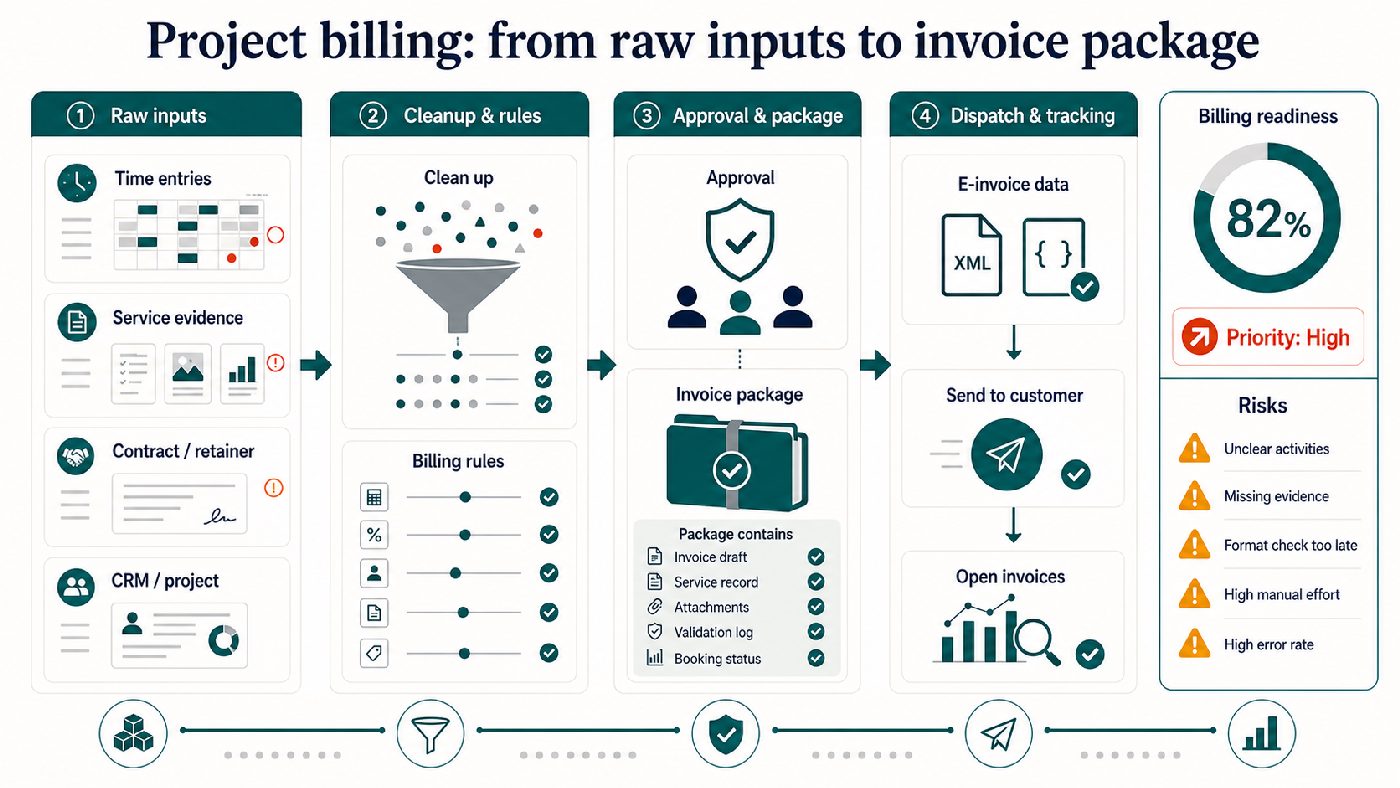
Accessible description and data
The infographic shows how time entries, service evidence, contract logic and project data become an auditable invoice package through cleanup, rules and approval.
Typical project-billing failure points
These points decide whether e-invoicing reduces work in a services business or simply adds another format problem.
| Issue | Risk | Target workflow |
|---|---|---|
| Inconsistent time entries | Invoice drafts require rework and clarification. | Clear rules for billable, internal, goodwill, retainer and project phase. |
| Missing service evidence | Customers approve invoices later or challenge line items. | Service evidence is prepared together with the invoice package. |
| Project and invoice data are separated | Invoice, CRM, project controlling and accounting tell different stories. | A reviewable billing view connects project, customer, contract and invoice. |
| Format checks happen too late | XRechnung, ZUGFeRD or recipient requirements appear only at sending time. | Format readiness and mandatory fields are checked before approval. |
Example: monthly billing from messy time entries
This example shows how a software or consulting project can be translated from scattered entries into a customer-ready invoice view.
| Raw state | Cleanup rule | Invoice view |
|---|---|---|
| Activities are called workshop, call, admin or PM and use inconsistent project names. | Entries are mapped to a small set of billable service categories and one clear project. | Project steering, expert workshop and implementation support become customer-readable. |
| 43.25 hours include internal alignment, goodwill and billable work. | Internal work, goodwill, retainer usage and billable extra work are separated. | 32.0 billable hours are approved with internal evidence and remaining-budget logic. |
| Retainer, extra work and travel expenses live in different tools. | Contract logic, service evidence and expenses are combined before invoice creation. | One invoice package contains draft invoice, service evidence, attachments and structured mandatory fields. |
Before and after in the invoice package
Before
- Inconsistent time entries create clarification work shortly before sending.
- Service evidence, contract logic and mandatory fields are collected late.
- The e-invoice appears at the end as a technical format problem.
After
- Approved service data, invoice draft and attachments are available as a package.
- Customer, service period, tax logic, references and line-item data are structured for review.
- Accounting and e-invoice output receive the same reliable invoice view.
How Momentum can support the workflow
Workflow design
- Billing logic, approvals and service evidence are described as a repeatable monthly process.
- Format decisions remain downstream of data quality and customer readability.
- The target is an invoice package that can be reviewed internally and understood externally.
Pilot or product path
- For a few customers, a manually supported pilot may be enough.
- For recurring volume, the path can become an automated workflow or later SaaS component.
- Existing tools are used first before introducing unnecessary new software.
Useful next steps

E-Invoicing Check
Check whether your invoice workflow covers format, validation, archiving and accounting handoff.
Open resource →

E-invoicing automation
The commercial hub for companies that want to turn format questions into a stable invoice process.
Open resource →
E-invoice conversion
Why conversion only works when semantics, mandatory fields and validation are clear.
Open resource →
